Storefront
Delivery estimate
"Order within 2h 15m and get it Thu to Sat" on product pages and the cart.
For answering when will it arrive before shoppers ask.
On the Starter plan and above
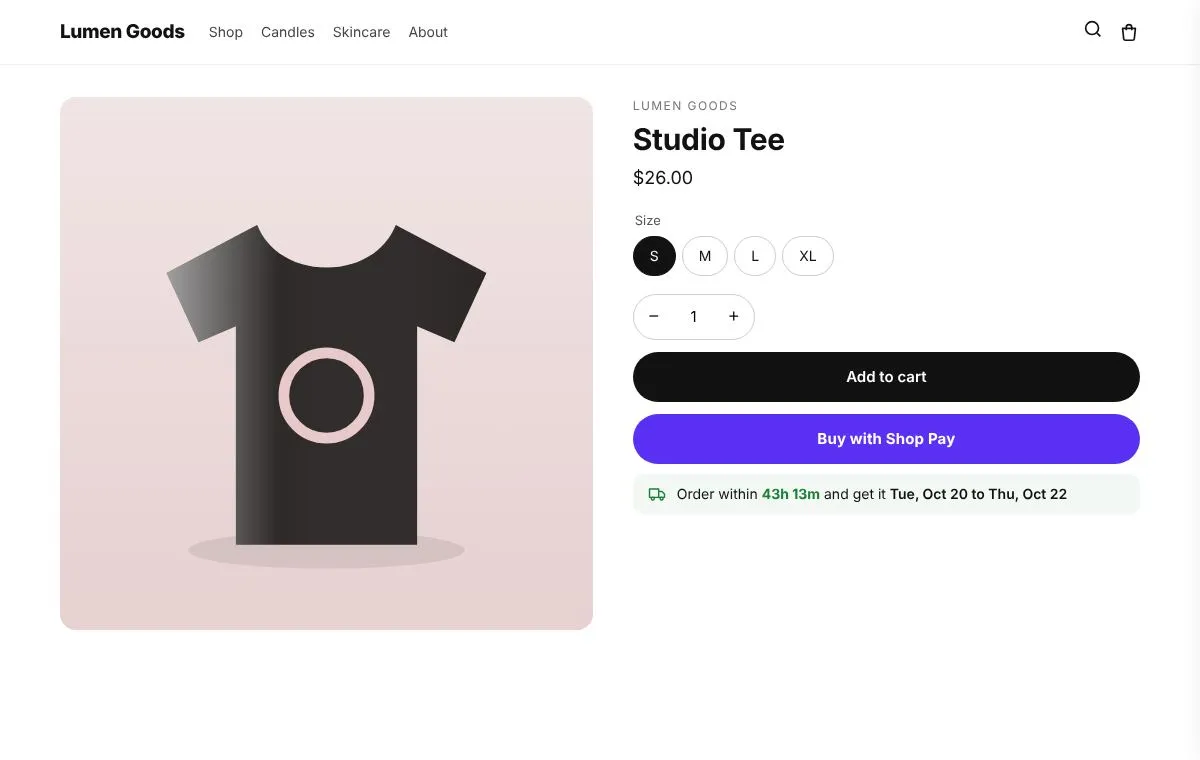
What you can set
- Order within 2h 15m and get it Thu to Sat
- Order cut off time, days off, holidays and delivery times per country
- On product pages and in the cart
How to set it up
- Install CRO Toolbox from the Shopify App Store.
- Open Storefront → Delivery estimate in the app, pick a template and set it up with the live preview.
- Click Add to theme: the theme editor opens with the block ready. Place it and save.
Ready made looks in the app
- Soft green box
- Simple line
- Blue box
- Warm
Questions about Delivery estimate
What does Delivery estimate do in CRO Toolbox?
"Order within 2h 15m and get it Thu to Sat" on product pages and the cart. For answering when will it arrive before shoppers ask.
Which plan includes Delivery estimate?
On the Starter plan and above. See pricing for the limits of each plan.
Does Delivery estimate work with my theme?
Yes, with any Online Store 2.0 theme. You set it up in the app and place it in the theme editor; your theme's code is never edited.
Coming soon to the Shopify App Store
Be first to install CRO Toolbox
CRO Toolbox is on its way to the Shopify App Store. The install button on this site will go straight to the listing the day it's live, with the Free plan and a 14 day trial on every paid plan.