Storefront
Footer
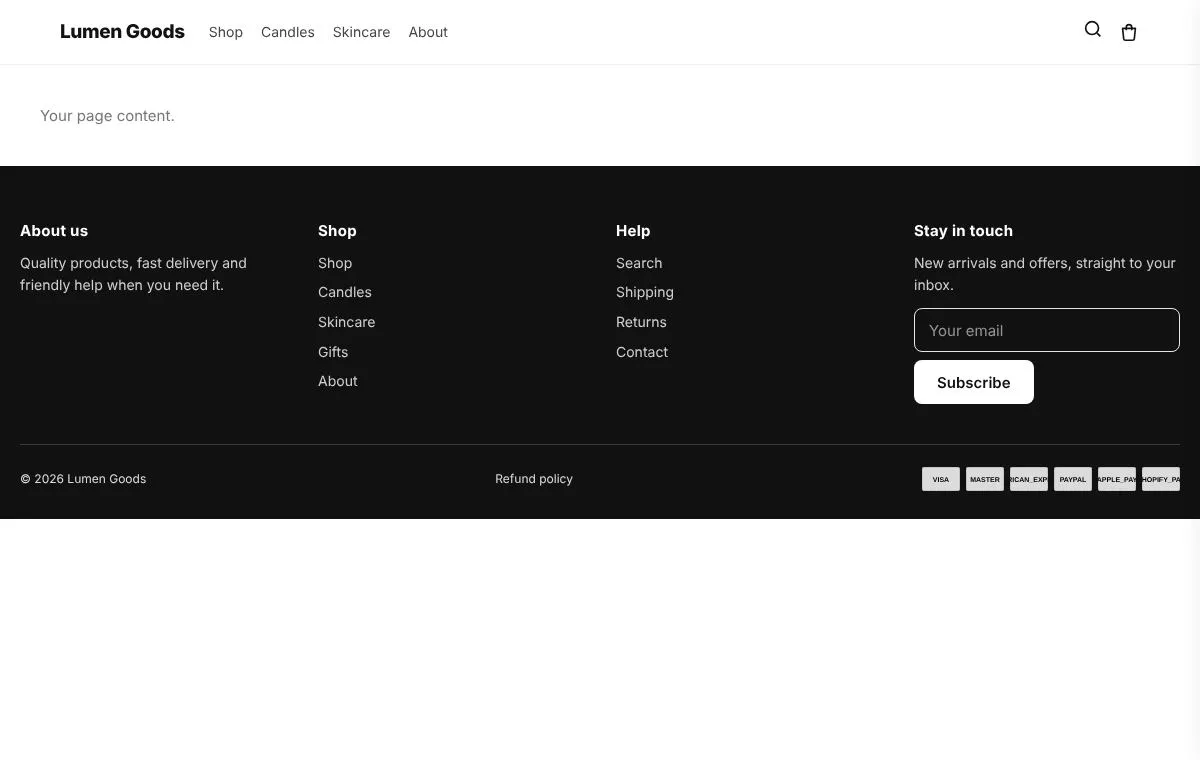
Your store's footer, designed in the app.
For a clean footer with your menus, newsletter and social links.
On the Starter plan and above
What you can set
- Columns from your menus
- Newsletter sign up and social icons
- Payment icons and policies
- Dark, light, centred and other looks
How to set it up
- Install CRO Toolbox from the Shopify App Store.
- Open Storefront → Footer in the app, pick a template and set it up with the live preview.
- Click Add to theme: the theme editor opens with the block ready. Place it and save.
Ready made looks in the app
- Dark columns
- Light columns
- Centred and simple
- Newsletter first
- Warm
Questions about Footer
What does Footer do in CRO Toolbox?
Your store's footer, designed in the app. For a clean footer with your menus, newsletter and social links.
Which plan includes Footer?
On the Starter plan and above. See pricing for the limits of each plan.
Does Footer work with my theme?
Yes, with any Online Store 2.0 theme. You set it up in the app and place it in the theme editor; your theme's code is never edited.
Coming soon to the Shopify App Store
Be first to install CRO Toolbox
CRO Toolbox is on its way to the Shopify App Store. The install button on this site will go straight to the listing the day it's live, with the Free plan and a 14 day trial on every paid plan.