Offers
After purchase offer
A one click offer shoppers can add right after paying.
For one more sale right after payment.
Included on the Free plan
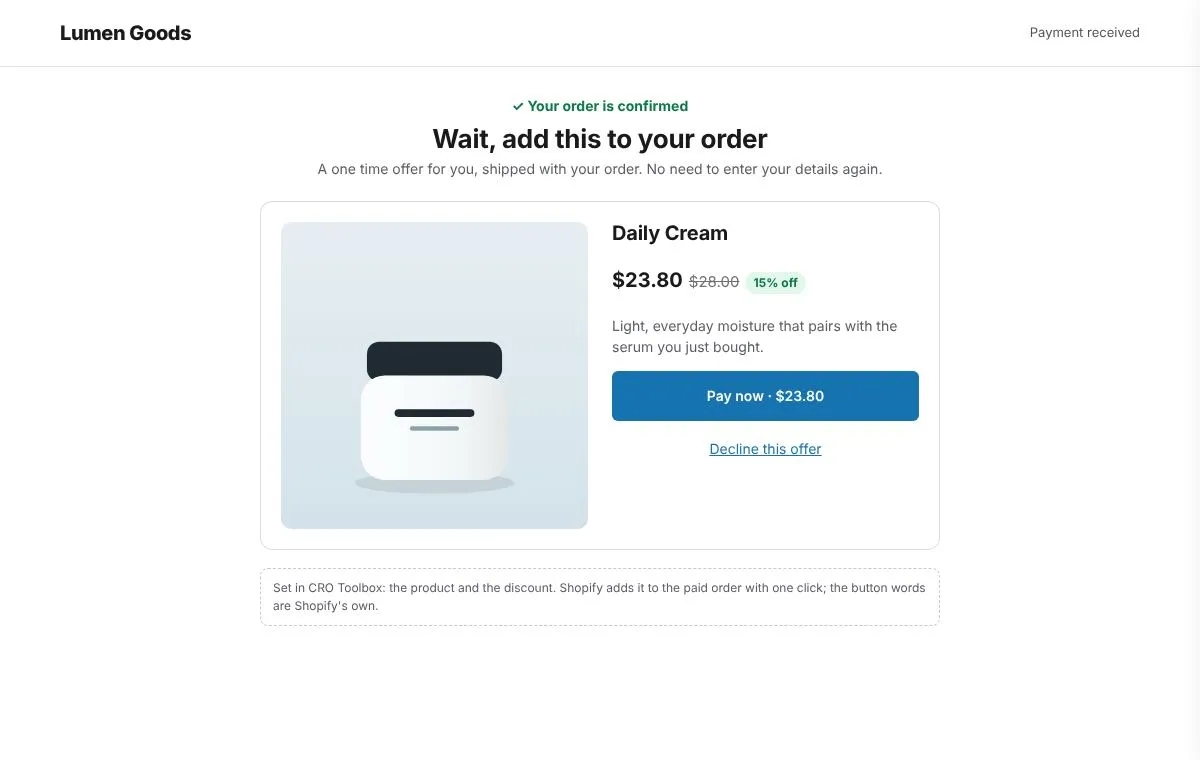
What you can set
- One product at a discount, added to the paid order in one click
- No new payment details
- Your product, discount and minimum order amount
How to set it up
- Install CRO Toolbox from the Shopify App Store.
- Open Checkout → After purchase offer in the app and set it up.
- Switch it on and check a test order at checkout.
Step by step help: Checkout rules, thank you page and after purchase offer →
Questions about After purchase offer
What does After purchase offer do in CRO Toolbox?
A one click offer shoppers can add right after paying. For one more sale right after payment.
Which plan includes After purchase offer?
Included on the Free plan. See pricing for the limits of each plan.
Does After purchase offer work on every Shopify plan?
It runs inside Shopify checkout. Installed from the Shopify App Store, CRO Toolbox doesn't need Shopify Plus for it.
Coming soon to the Shopify App Store
Be first to install CRO Toolbox
CRO Toolbox is on its way to the Shopify App Store. The install button on this site will go straight to the listing the day it's live, with the Free plan and a 14 day trial on every paid plan.